EMAIL API
SendGridの
メール送信API
システムからのメール送信をもっとシンプルに。
様々なフレームワークやライブラリが利用できるので、使い慣れた言語でメール送信機能を実装できます。
-


サインアップ
メール -


購入完了通知
-


システム
アラート


















ビジネスに欠かせないメール
だからこそSendGridで
-
高速・
高到達率
重要な通知メールも
速く、確実に配信 -
詳細なログ

メールの不達時も
原因調査と対処が簡単 -
テンプレート
機能
デザイン性の高いHTML
メールを手軽に作成・運用 -
セキュリティ

二要素認証や
アクセス
権限設定で安全に -
スケーラビリティ

送信規模がどれだけ
増えても、ずっと使える
FEATURES SendGridでできること
1わずか5分で!API連携や
SMTPリレーでメール送信
豊富なAPIで、トランザクションメールを
細かくカスタマイズ
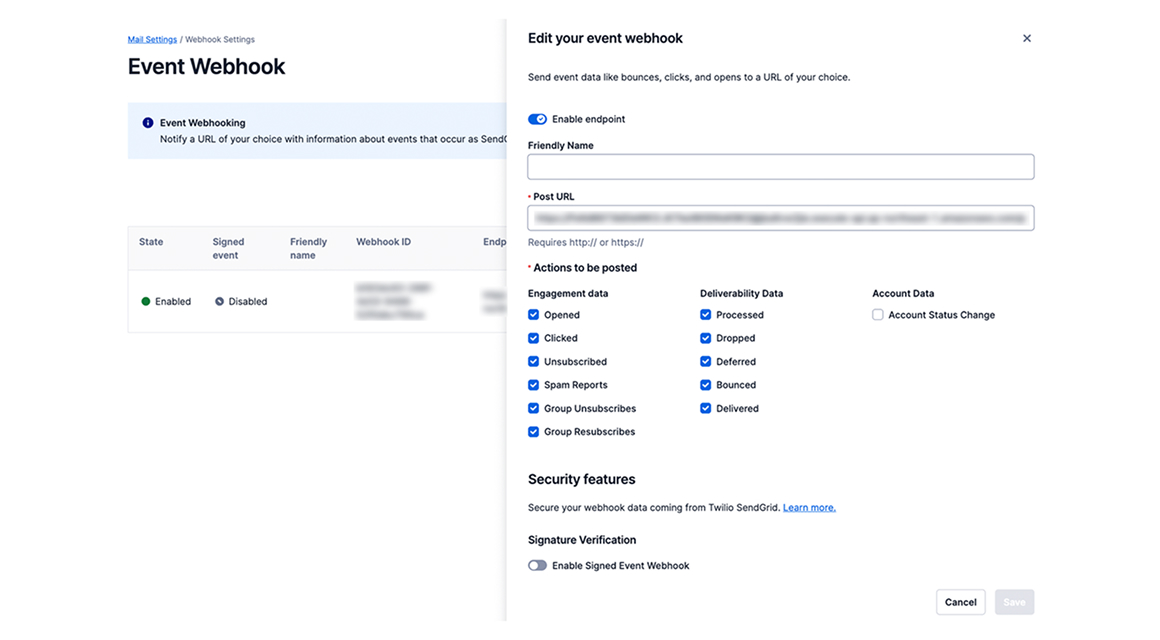
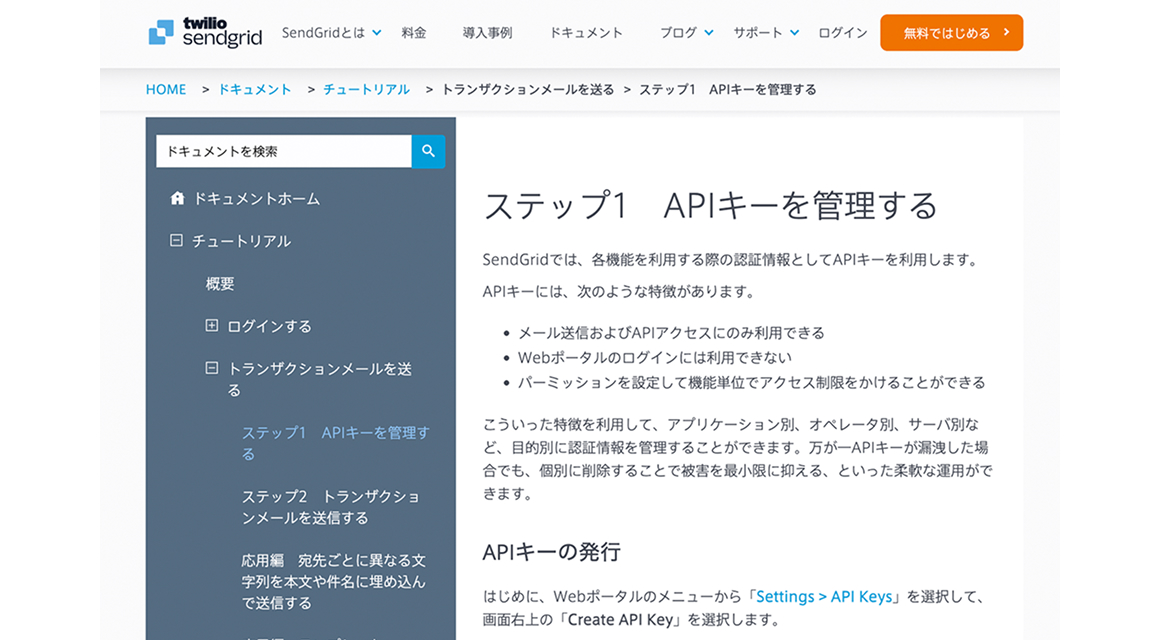
- Python, Java, C#, PHP, Go, Ruby, Node.jsなど、様々な
言語のライブラリやフレームワークが利用可能 - 配信状況や開封、クリックなどのイベントデータをEvent Webhookでリアルタイムに通知
- APIリファレンス、チュートリアル、よくあるご質問など、日本語マニュアルが充実しているから安心
-
1 curl --request POST \ 2 --url https://api.sendgrid.com/v3/mail/send \ 3 --header "Authorization: Bearer $SENDGRID_API_KEY" \ 4 --header 'Content-Type: application/json' \ 5 --data '{"personalizations": [{"to": [{"email": "test@example.com"}]}],"from": {"email": "test@example.com"},"subject": "Sending with SendGrid is Fun","content": [{"type": "text/plain", "value": "and easy to do anywhere, even with cURL"}]}' 1 # using SendGrid's Python Library 2 # https://github.com/sendgrid/sendgrid-python 3 import os 4 from sendgrid import SendGridAPIClient 5 from sendgrid.helpers.mail import Mail 6 7 message = Mail( 8 from_email='from_email@example.com', 9 to_emails='to@example.com', 10 subject='Sending with Twilio SendGrid is Fun', 11 html_content='<strong>and easy to do anywhere, even with Python</strong>') 12 try: 13 sg = SendGridAPIClient(os.environ.get('SENDGRID_API_KEY')) 14 response = sg.send(message) 15 print(response.status_code) 16 print(response.body) 17 print(response.headers) 18 except Exception as e: 19 print(e.message) 1 // using SendGrid's Java Library 2 // https://github.com/sendgrid/sendgrid-java 3 import com.sendgrid.*; 4 import java.io.IOException; 5 6 public class Example { 7 public static void main(String[] args) throws IOException { 8 Email from = new Email("test@example.com"); 9 String subject = "Sending with SendGrid is Fun"; 10 Email to = new Email("test@example.com"); 11 Content content = new Content("text/plain", "and easy to do anywhere, even with Java"); 12 Mail mail = new Mail(from, subject, to, content); 13 14 SendGrid sg = new SendGrid(System.getenv("SENDGRID_API_KEY")); 15 Request request = new Request(); 16 try { 17 request.setMethod(Method.POST); 18 request.setEndpoint("mail/send"); 19 request.setBody(mail.build()); 20 Response response = sg.api(request); 21 System.out.println(response.getStatusCode()); 22 System.out.println(response.getBody()); 23 System.out.println(response.getHeaders()); 24 } catch (IOException ex) { 25 throw ex; 26 } 27 } 28 } 1 // using SendGrid's C# Library 2 // https://github.com/sendgrid/sendgrid-csharp 3 using SendGrid; 4 using SendGrid.Helpers.Mail; 5 using System; 6 using System.Threading.Tasks; 7 8 namespace Example 9 { 10 internal class Example 11 { 12 private static void Main() 13 { 14 Execute().Wait(); 15 } 16 17 static async Task Execute() 18 { 19 var apiKey = Environment.GetEnvironmentVariable("NAME_OF_THE_ENVIRONMENT_VARIABLE_FOR_YOUR_SENDGRID_KEY"); 20 var client = new SendGridClient(apiKey); 21 var from = new EmailAddress("test@example.com", "Example User"); 22 var subject = "Sending with SendGrid is Fun"; 23 var to = new EmailAddress("test@example.com", "Example User"); 24 var plainTextContent = "and easy to do anywhere, even with C#"; 25 var htmlContent = "<strong>and easy to do anywhere, even with C#</strong>"; 26 var msg = MailHelper.CreateSingleEmail(from, to, subject, plainTextContent, htmlContent); 27 var response = await client.SendEmailAsync(msg); 28 } 29 } 30 } 1 <?php 2 require 'vendor/autoload.php'; // If you're using Composer (recommended) 3 // Comment out the above line if not using Composer 4 // require("<PATH TO>/sendgrid-php.php"); 5 // If not using Composer, uncomment the above line and 6 // download sendgrid-php.zip from the latest release here, 7 // replacing <PATH TO> with the path to the sendgrid-php.php file, 8 // which is included in the download: 9 // https://github.com/sendgrid/sendgrid-php/releases 10 11 $email = new \SendGrid\Mail\Mail(); 12 $email->setFrom("test@example.com", "Example User"); 13 $email->setSubject("Sending with SendGrid is Fun"); 14 $email->addTo("test@example.com", "Example User"); 15 $email->addContent("text/plain", "and easy to do anywhere, even with PHP"); 16 $email->addContent( 17 "text/html", "<strong>and easy to do anywhere, even with PHP</strong>" 18 ); 19 $sendgrid = new \SendGrid(getenv('SENDGRID_API_KEY')); 20 try { 21 $response = $sendgrid->send($email); 22 print $response->statusCode() . "\n"; 23 print_r($response->headers()); 24 print $response->body() . "\n"; 25 } catch (Exception $e) { 26 echo 'Caught exception: '. $e->getMessage() ."\n"; 27 } 1 // using SendGrid's Go Library 2 // https://github.com/sendgrid/sendgrid-go 3 package main 4 5 import ( 6 "fmt" 7 "log" 8 "os" 9 10 "github.com/sendgrid/sendgrid-go" 11 "github.com/sendgrid/sendgrid-go/helpers/mail" 12 ) 13 14 func main() { 15 from := mail.NewEmail("Example User", "test@example.com") 16 subject := "Sending with SendGrid is Fun" 17 to := mail.NewEmail("Example User", "test@example.com") 18 plainTextContent := "and easy to do anywhere, even with Go" 19 htmlContent := "<strong>and easy to do anywhere, even with Go</strong>" 20 message := mail.NewSingleEmail(from, subject, to, plainTextContent, htmlContent) 21 client := sendgrid.NewSendClient(os.Getenv("SENDGRID_API_KEY")) 22 response, err := client.Send(message) 23 if err != nil { 24 log.Println(err) 25 } else { 26 fmt.Println(response.StatusCode) 27 fmt.Println(response.Body) 28 fmt.Println(response.Headers) 29 } 30 } 1 # using SendGrid's Ruby Library 2 # https://github.com/sendgrid/sendgrid-ruby 3 require 'sendgrid-ruby' 4 include SendGrid 5 6 from = Email.new(email: 'test@example.com') 7 to = Email.new(email: 'test@example.com') 8 subject = 'Sending with SendGrid is Fun' 9 content = Content.new(type: 'text/plain', value: 'and easy to do anywhere, even with Ruby') 10 mail = Mail.new(from, subject, to, content) 11 12 sg = SendGrid::API.new(api_key: ENV['SENDGRID_API_KEY']) 13 response = sg.client.mail._('send').post(request_body: mail.to_json) 14 puts response.status_code 15 puts response.body 16 puts response.headers 1 // using Twilio SendGrid's v3 Node.js Library 2 // https://github.com/sendgrid/sendgrid-nodejs 3 javascript 4 const sgMail = require('@sendgrid/mail') 5 sgMail.setApiKey(process.env.SENDGRID_API_KEY) 6 const msg = { 7 to: 'test@example.com', // Change to your recipient 8 from: 'test@example.com', // Change to your verified sender 9 subject: 'Sending with SendGrid is Fun', 10 text: 'and easy to do anywhere, even with Node.js', 11 html: '<strong>and easy to do anywhere, even with Node.js</strong>', 12 } 13 sgMail 14 .send(msg) 15 .then(() => { 16 console.log('Email sent') 17 }) 18 .catch((error) => { 19 console.error(error) 20 }) -
-
2最優先事項は
確実に宛先に届けること
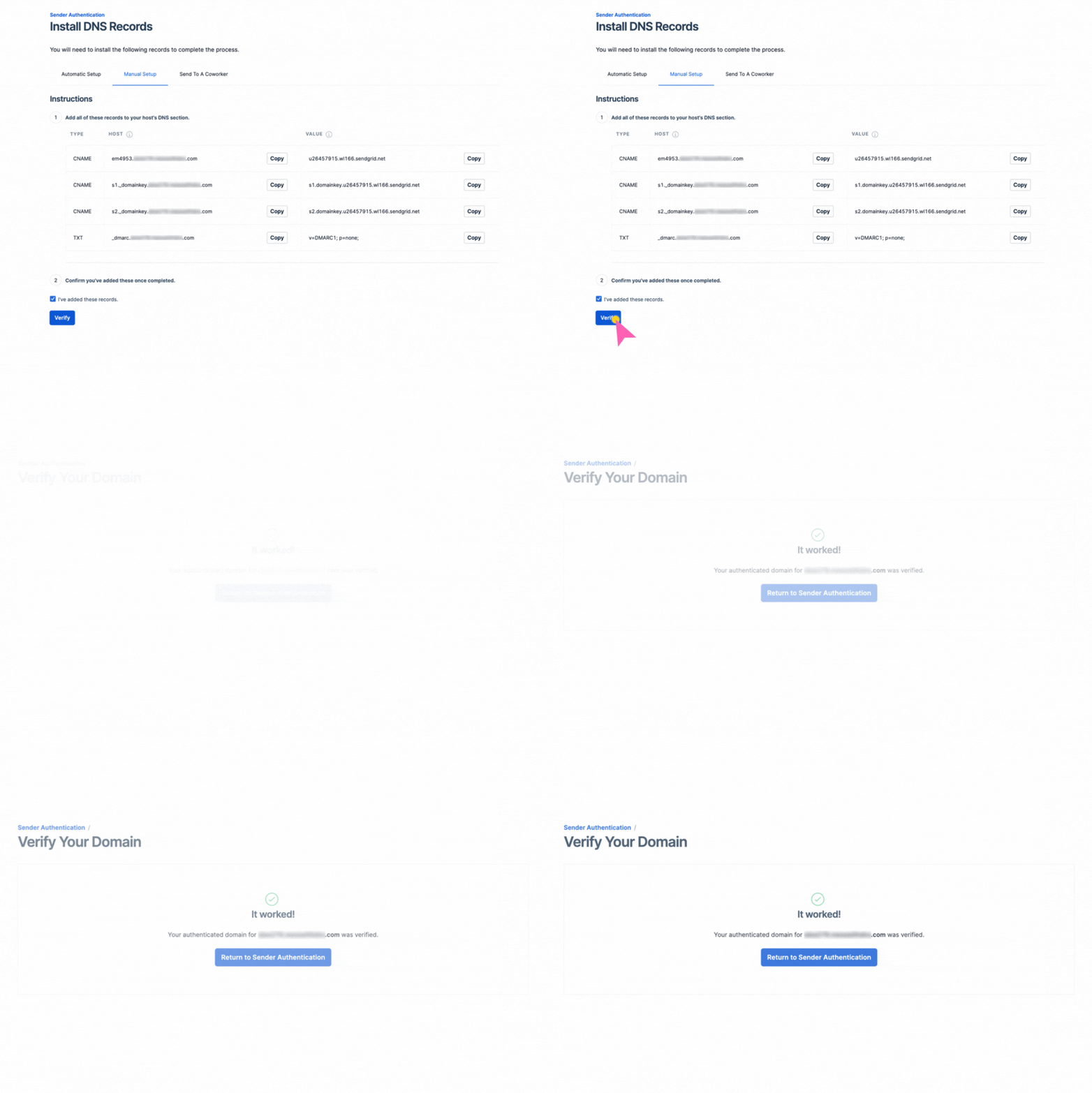
世界標準の配信技術を手軽に導入
- 独自ドメインでのSPF / DKIM認証や送信元IPアドレスの逆引き設定も簡単。最新のベストプラクティスはSendGridにお任せ
- 専用の送信元IPアドレスで、他アカウントの影響を受けない安定配信を実現します
- 届かなかったメールは、エラーの種類に応じて再送や破棄など適切に自動処理
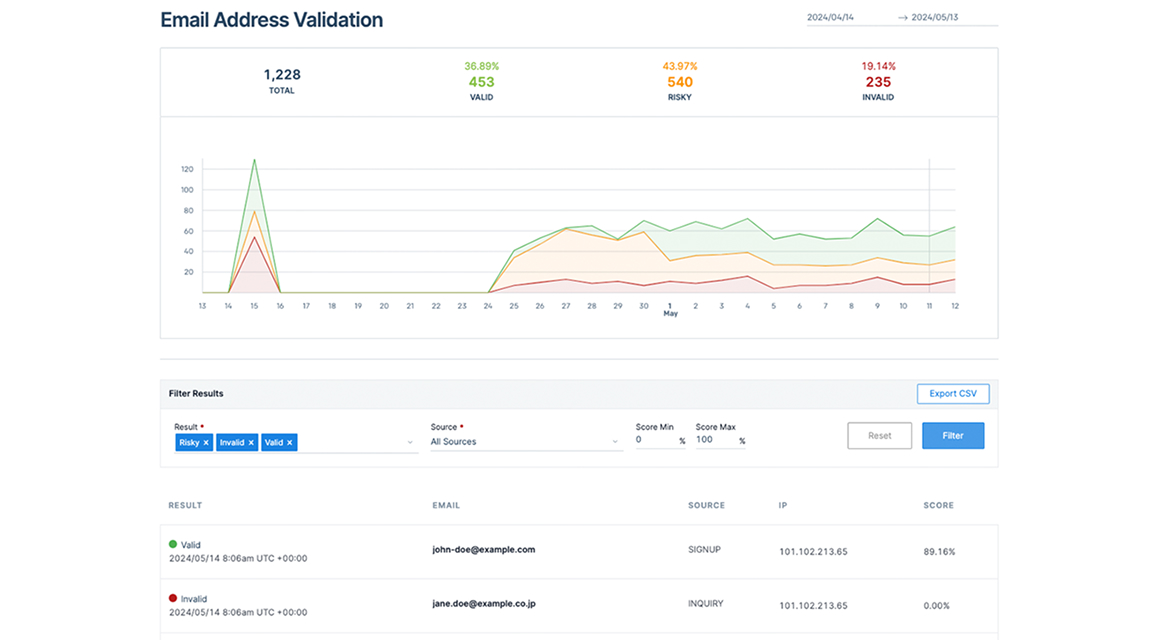
- メールアドレスの有効性をAPIで検証可能。バウンスを未然に防ぎ、レピュテーションを守ります

3メール配信状況の見える化
到達状況や受信者の反応を詳しく追跡し、
運用改善へ
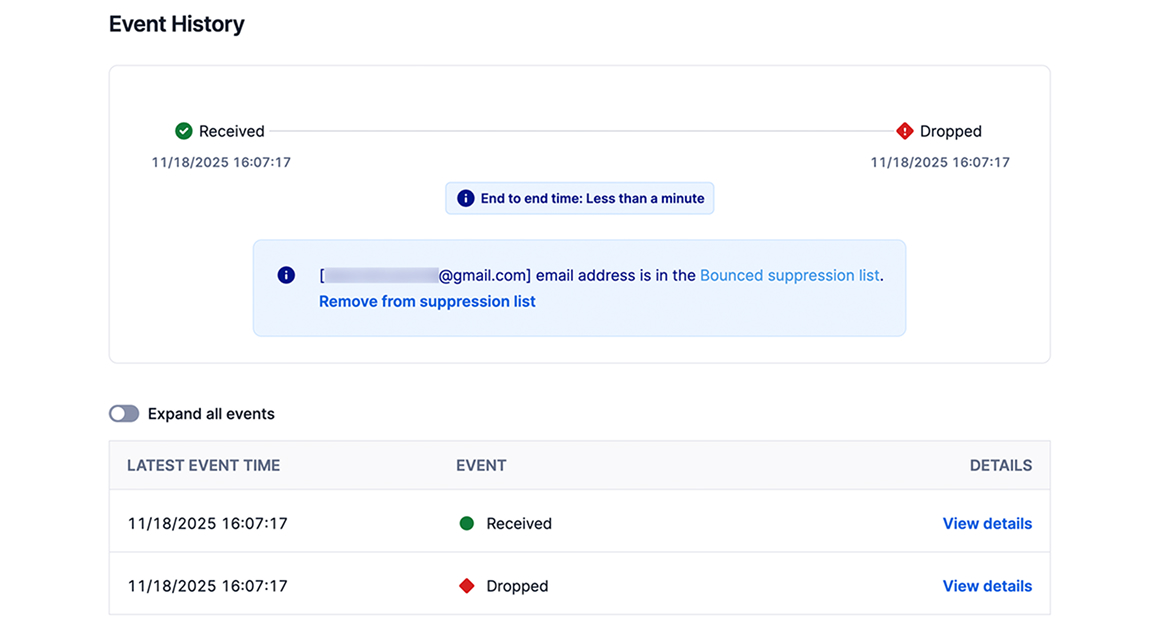
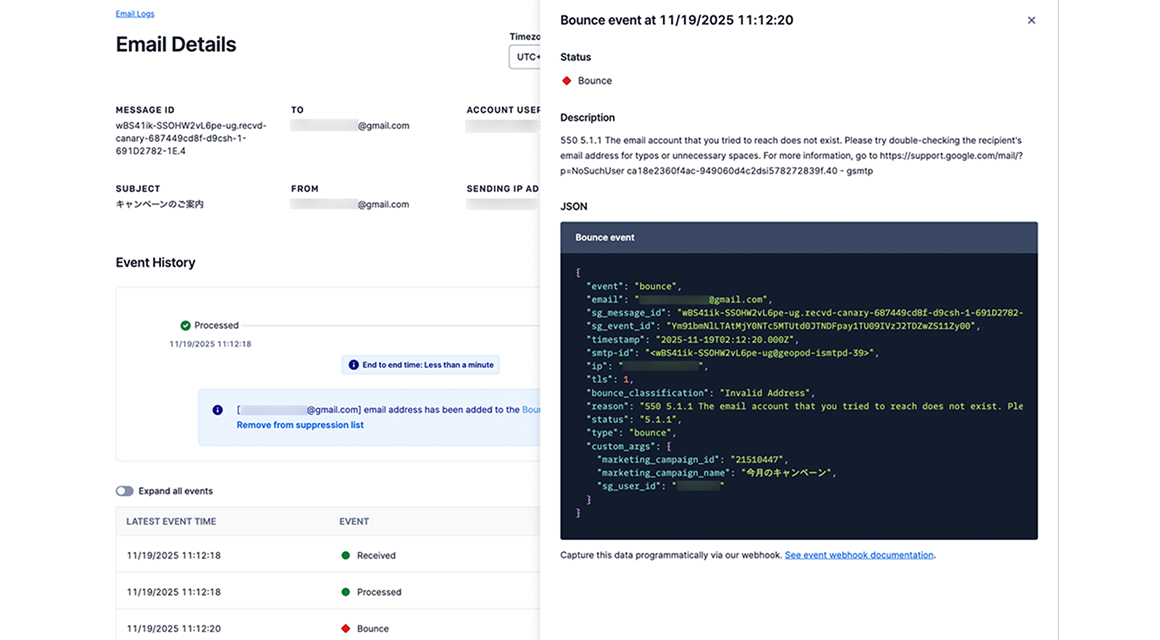
- 到達、遅延、開封、クリックなど、送信したメールに関する一連のイベントを詳細に把握
- バウンス(不達)の理由を確認できるから対策を立てやすい
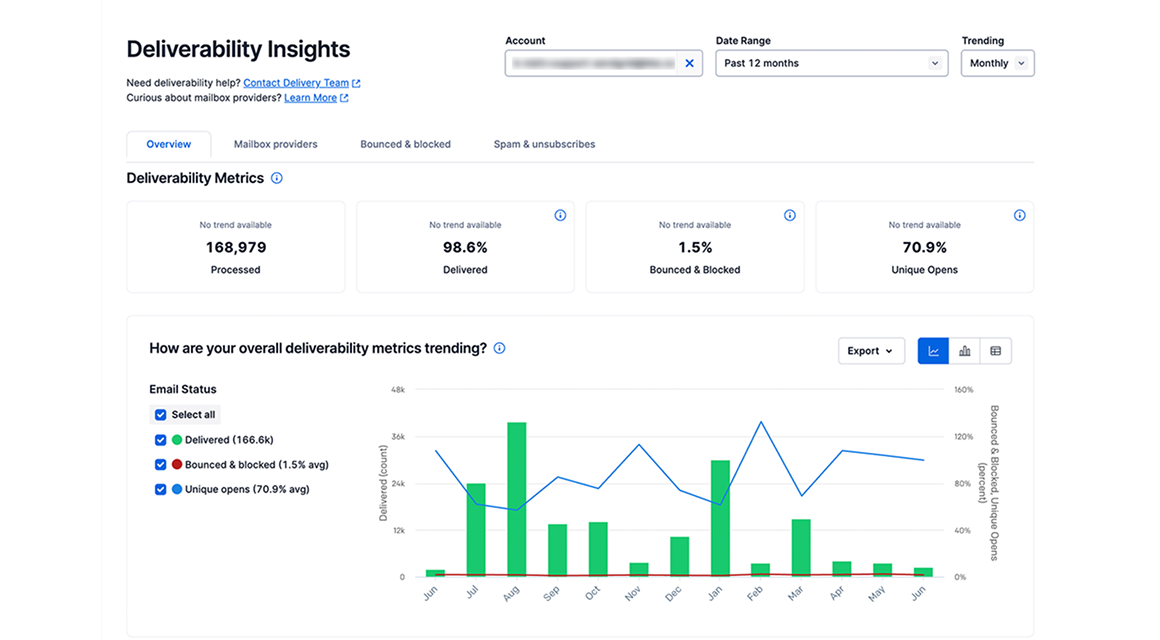
- 配信実績はグラフで確認。メールの成果もひと目でわかります
4セキュアな送信環境
権限管理や暗号化など、
大切な情報を
扱うサービスにふさわしい設計
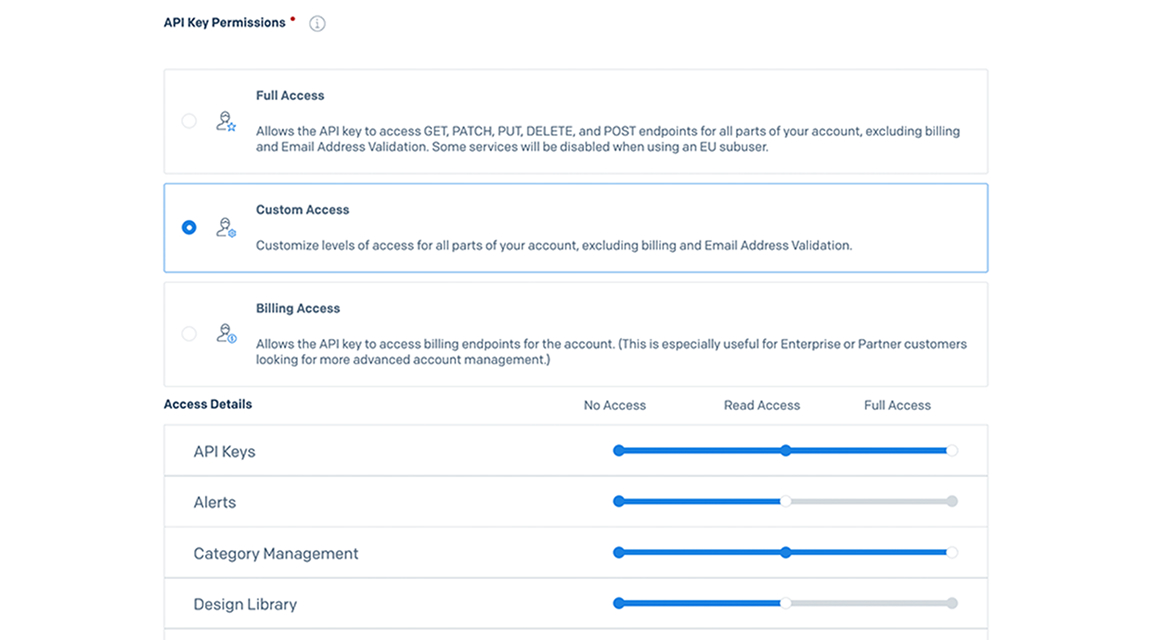
- 二要素認証、IPアドレス制限、ユーザやAPIキーごとの権限管理など、安心のセキュリティ
- メール本文や添付ファイルなどのデータを暗号化する、TLS送信に対応
- セキュアかつ分散・冗長化されたインフラで、安定したメール配信を実現


5あらゆるメール配信を
1つのプラットフォームで
ブラウザ操作だけで簡単に送れる
一斉配信機能も搭載
- 宛先管理、一斉配信、配信状況の確認など、UIも充実
- ノーコードでメールテンプレートを作成可能。エンジニア、マーケター、デザイナーの共同作業もシームレスに


LEARN MORE SendGridをご検討中の方へ
多くの企業様に
選ばれ続けています
-
月間送信通数2,000億通+
ピーク時の配信実績は
1時間で10億通 -
月間稼働率99.99%
非常に高い可用性を有する
メール送信API -
時間あたりの送信上限無制限
どんなに大量のメールでも
宛先サーバまでわずか数秒
FAQ よくあるご質問
-
無料トライアルでは何ができますか?
-
Essentialsプラン相当の機能をすべてお試しいただけます。ただし、「送信できるのは1日100通まで」「Event WebhookのPOST先は1つまで」などの制限事項があります。詳しくはこちらをご確認ください。
-
無料トライアル期間が終了するとどうなりますか?
-
メール送信ができなくなります。自動で有料プランへ移行されることはないため、継続してご利用になる場合はご自身でプランをご変更ください。
-
個人でも利用できますか?
-
SendGridは法人向けのサービスです。個人でのご利用は受け付けておりません。
-
メールの送信通数がプランの上限を超えるとどうなりますか?
-
プランに応じた上限超過料金が発生します。ただし、無料トライアルの場合は上限に到達するとそれ以上送信できなくなります。
-
1時間あたりに送信できるメールの数に上限はありますか?
-
特に制限はありません。月間2,000億通以上のメールを処理する、SendGridの強力かつ安定したインフラをご利用いただけます。
-
送信元アドレス(From)に独自ドメインのメールアドレスを指定することはできますか?
-
はい、お客様が保有されているドメインのメールアドレスをFromに指定することができます。SPFやDKIMにも対応しています。
-
メールがちゃんと届いたか分かりますか?
-
メールが宛先サーバに正常に受け付けられた(あるいは拒否された)ことをダッシュボード上やAPI経由で確認できます。また、メールの開封、リンクのクリック、配信停止の有無などについても同様です。
-
配信停止リクエストやバウンス(エラーメール)への対処は簡単ですか?
-
はい。配信停止されたアドレスや存在しないアドレスなど、送信すべきではない宛先へのメールは送信前に自動的に破棄されるため、個別に対処する必要はありません。
-
プログラミングできないのですが、SendGridで一括メール送信することはできますか?
-
マーケティングキャンペーン機能を使えば、ブラウザ上の操作だけでメールを一括送信することができます。もちろん、宛名の差し込みやスケジュール配信も可能です。
-
Gmailや携帯キャリア宛のメールにも対応していますか?
-
はい、対応しています。
Gmailをはじめとする主要なインボックスプロバイダの最新動向を常に把握し、適切に対処しています。全世界で月間2,000億通以上の配信実績を誇るSendGridを、どうぞ安心してご利用ください。